

Other
Trackmania Controls Guide: All PC & Controller Keybinds (Xbox, PlayStation)
Posted on by cade-davie
Trackmania is all about speed, but you won't be able to cruise past your competition without knowing how to control your vehicle. Whether playing on PC, PlayStation, or Xbox, giving your settings a quick look can make a huge difference in your driving performance. Look below to see all of the Trackmania controls and decide what will work best for you!
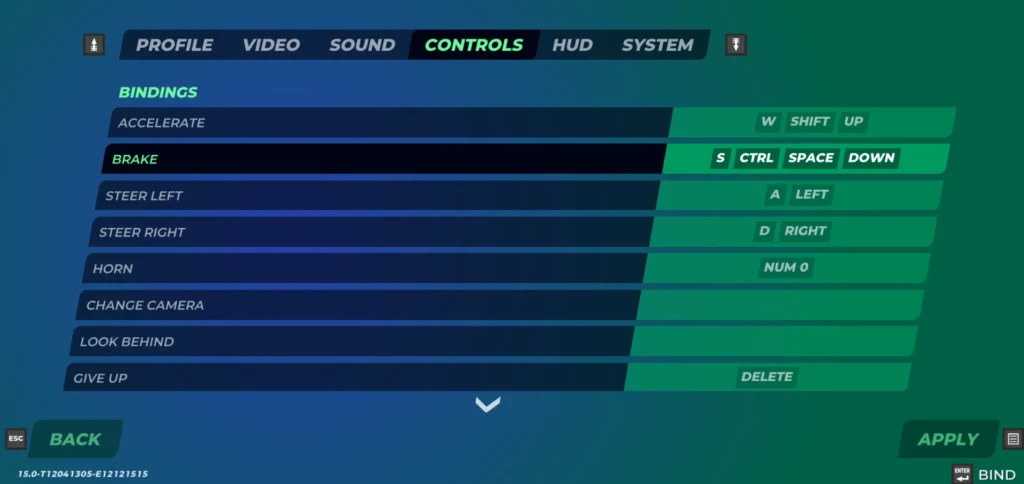 The best part about the keybinds in Trackmania is that you can change them. You can switch up your controls to be exactly what you need for your playstyle! Of course, you can find the default controls listed below if you aren't one for remapping keybinds.
Additionally, not all controls in Trackmania are mapped by default. Make sure to look through the game's settings yourself so that you can adjust your preferred keymapping and have access to all of the controls you want. Especially when playing on PlayStation or Xbox, you'll find that many keybindings haven't been set.
Some gameplay functions, such as spectating players, might not be as essential. As a result, you can easily take the keybindings away from those functions and use them for something else. Neither the Square button on PlayStation nor the X button on Xbox is used by default, and each is an excellent option for giving yourself even more racing control.
The best part about the keybinds in Trackmania is that you can change them. You can switch up your controls to be exactly what you need for your playstyle! Of course, you can find the default controls listed below if you aren't one for remapping keybinds.
Additionally, not all controls in Trackmania are mapped by default. Make sure to look through the game's settings yourself so that you can adjust your preferred keymapping and have access to all of the controls you want. Especially when playing on PlayStation or Xbox, you'll find that many keybindings haven't been set.
Some gameplay functions, such as spectating players, might not be as essential. As a result, you can easily take the keybindings away from those functions and use them for something else. Neither the Square button on PlayStation nor the X button on Xbox is used by default, and each is an excellent option for giving yourself even more racing control.
All Controls & Keybinds for Trackmania (Keyboard & Mouse, PlayStation and Xbox Controllers)
The best part about the keybinds in Trackmania is that you can change them. You can switch up your controls to be exactly what you need for your playstyle! Of course, you can find the default controls listed below if you aren't one for remapping keybinds.
Additionally, not all controls in Trackmania are mapped by default. Make sure to look through the game's settings yourself so that you can adjust your preferred keymapping and have access to all of the controls you want. Especially when playing on PlayStation or Xbox, you'll find that many keybindings haven't been set.
Some gameplay functions, such as spectating players, might not be as essential. As a result, you can easily take the keybindings away from those functions and use them for something else. Neither the Square button on PlayStation nor the X button on Xbox is used by default, and each is an excellent option for giving yourself even more racing control.
PC (Keyboard & Mouse)
- Accelerate: W/Shift/Up
- Brake: S/Ctrl/Space/Down
- Steer Left: A/Left
- Steer Right: D/Right
- Horn: Num 0
- Give Up: Delete
- Respawn: Backspace
- Action Slot 1: 1
- Action Slot 2: 2
- Action Slot 3: 3
- Action Slot 4: 4
- Action Slot 5: 5
- Show/Hide Ghost: G
- Show/Hide Opponents: O
- Save Replay: R
- Save Previous Replay: P
- Menu: Esc
- Show/Hide Interface: *
- Show/Hide Names: '
- Show/Hide Scores: Tab
- Prev Score/Chat Page: Home
- Next Score/Chat Page: End
- Save Screenshot: F10
- Chat: Enter
- Chat to All: T
- Open/Close Chat: C
- Voice Push-to-Talk: X
- Analyser: -
- Spectate Previous Player: Page Up
- Spectate Next Player: Page Down
- Auto Spectator: Numpadcomma
- Camera 1: Num 1
- Camera 2: Num 2
- Camera 3: Num 3
- Camera 4: Num 4
- Camera 5: Num 5
- Camera 6: Num 6
- Camera Free: Num 7
PlayStation Controller
- Accelerate: R2
- Brake: L2
- Steer Left: Push Left Analog Stick left
- Steer Right: Push Left Analog Stick right
- Horn: L3
- Change Camera: R3
- Give Up: Circle
- Respawn: Triangle
- Menu: Options Button
- Show/Hide Scores: R1
- Prev Score/Chat Page: D-Pad Up
- Next Score/Chat Page: D-Pad Down
- Chat: Touchpad
- Spectate Previous Player: D-Pad Left
- Spectate Next Player: D-Pad Right
- Auto Spectator: Cross
Xbox Controller
- Accelerate: RT
- Brake: LT
- Steer Left: Push Left Analog Stick left
- Steer Right: Push Left Analog Stick right
- Horn: L
- Change Camera: R
- Give Up: B
- Respawn: Y
- Menu: Menu Button
- Show/Hide Scores: RB
- Prev Score/Chat Page: D-Pad Up
- Next Score/Chat Page: D-Pad Down
- Chat: View Button
- Spectate Previous Player: D-Pad Left
- Spectate Next Player: D-Pad Right
- Auto Spectator: A
responseTitle
responseCount responseOkayLabel
 responsePerfectLabel
 responseLovedLabel