
Risk of Rain 2
Risk of Rain 2 Controls Guide: PC, PlayStation, Xbox, & Nintendo Switch
Posted on by justin
Risk of Rain 2 focuses on efficient character movement to prevent an early death. One way to help prevent this tragedy is by understanding the game’s controls until muscle memory remembers which keybind is for a specific action. So, keep reading this Risk of Rain 2 Controls Guide to know the different default keybinds for the game’s various versions.
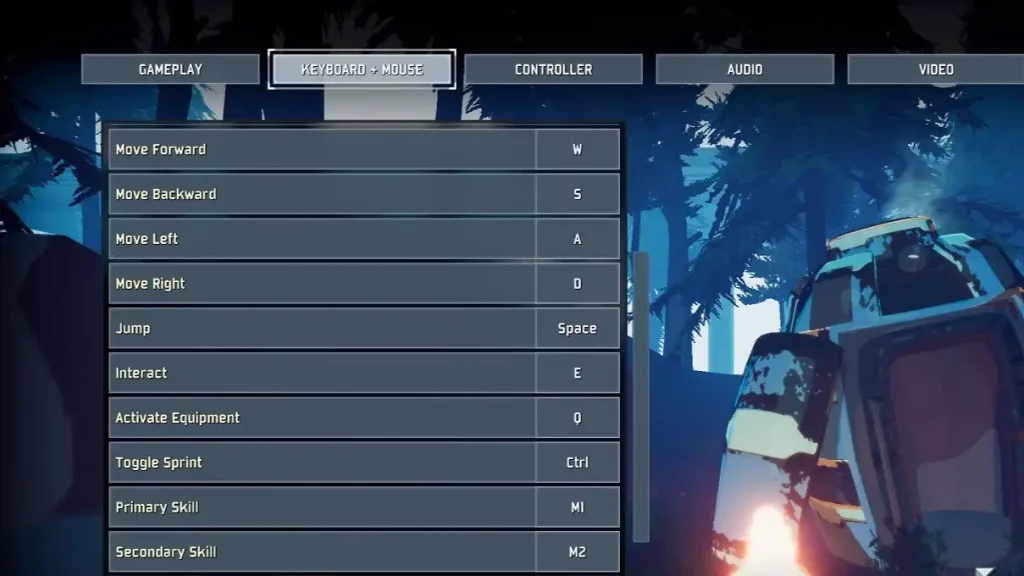 Note that all the controls for Risk of Rain 2 can be modified in the game's Settings menu. Nonetheless, here are the default in-game controls to know the keybinds and to learn how to move your chosen Survivor efficiently:
All Controls & Keybinds for Risk of Rain 2
Note that all the controls for Risk of Rain 2 can be modified in the game's Settings menu. Nonetheless, here are the default in-game controls to know the keybinds and to learn how to move your chosen Survivor efficiently:
PC (Keyboard & Mouse)
- Move Forward: W
- Move Backward: S
- Move Right: D
- Move Left: A
- Jump: Space
- Interact: E
- Info Screen: Tab
- Activate Equipment: Q
- Toggle Sprint: Ctrl
- Primary Skill: Left mouse button
- Secondary Skill: Right mouse button
- Utility Skill: Shift
- Special Skill: R
- Ping: Middle mouse button
PC (Controller)
- Basic Character Movement: Left analog stick
- Look Around: Right analog stick
- Jump: A
- Interact: X
- Info Screen: Menu
- Activate Equipment: Y
- Primary Skill: Right Trigger
- Secondary Skill: Left Trigger
- Utility Skill: Left Bumper
- Special Skill: Right Bumper
- Ping: Press right analog stick
PlayStation 4 & 5
- Basic Character Movement: Left analog stick
- Look Around: Right analog stick
- Jump: X
- Interact: Square
- Info Screen: Options
- Activate Equipment: Triangle
- Primary Skill: R2
- Secondary Skill: L2
- Utility Skill: L1
- Special Skill: R1
- Ping: R3
Xbox One, X, & S
- Basic Character Movement: Left analog stick
- Look Around: Right analog stick
- Jump: A
- Interact: X
- Info Screen: Menu
- Activate Equipment: Y
- Primary Skill: Right Trigger
- Secondary Skill: Left Trigger
- Utility Skill: Left Bumper
- Special Skill: Right Bumper
- Ping: Press right analog stick
Nintendo Switch
- Basic Character Movement: Left analog stick
- Look Around: Right analog stick
- Jump: B
- Interact: Y
- Info Screen: Start (+)
- Activate Equipment: X
- Primary Skill: ZR
- Secondary Skill: ZL
- Utility Skill: L
- Special Skill: R
- Ping: Press right analog stick
responseTitle
responseCount responseOkayLabel
 responsePerfectLabel
 responseLovedLabel