(Estimated Read Time: 3 minutes)
Before building an empire and conquering the world in Myth of Empires, you must first learn and master its basic controls. With that in mind, here we'll cover all the controls and keybinds for Myth of Empires.
Myth of Empires Controls and Keybinds
First, it's important to mention that Myth of Empires is only available on the PC through
Steam. Additionally, it has limited controller support at the time of writing. In other words, players may use a controller to play the game, but some buttons
may not work on their chosen gamepads.
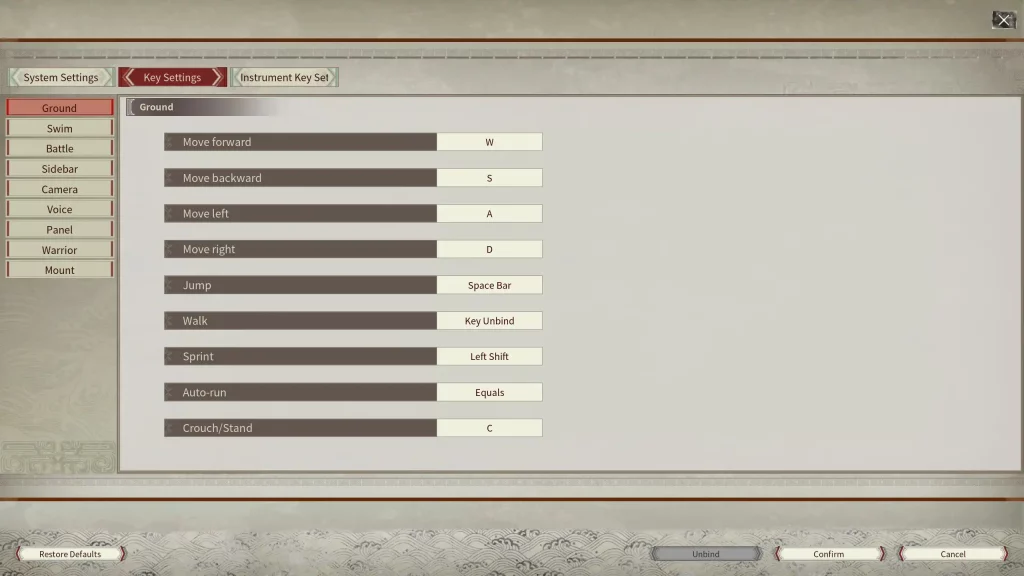
With that, here are all the basic PC controls for Myth of Empires using the keyboard and mouse peripherals:
Ground
- Move forward: W
- Move backward: S
- Move left: A
- Move right: D
- Jump: Space Bar
- Walk: N/A
- Sprint: Left Shift
- Auto-run: Equals (=)
- Crouch/Stand: C
Swim
- Swim up: Space Bar
- Swim down: Q
Battle
- Climb: Space Bar
- Block: Right Mouse Button
- Attack: Left Mouse Button
- Kick: F
- Attack upwards: Num 8
- Attack downwards: Num 2
- Attack left: Num 4
- Attack Right: Num 6
- Attack from upper left: Num 7
- Attack from upper right: Num 9
- Attack from bottom left: Num 1
- Attack from bottom right: Num 3
- Toggle single/continuous attack: B
- Mainhand weapon skill: X
- Offhand weapon skill: Z
Sidebar
- Sidebar 1: 1
- Sidebar 2: 2
- Sidebar 3: 3
- Sidebar 4: 4
- Sidebar 5: 5
- Sidebar 6: 6
- Sidebar 7: 7
- Sidebar 8: 8
- Sidebar 9: 9
- Sidebar 0: 0
- Sidebar Last Page: Shift + Up
- Sidebar Next Page: Shift + Down
Camera
- Zoom out: Mouse Wheel Down
- Zoom in: Mouse Wheel Up
- Track projectile: Left Alt
- Toggle perspective: V
- Free camera: O
Voice
Panel
- Show/hide chatbox: Ctrl + T
- Show/hide message prompts: Ctrl + R
- Open Crafting Panel: P
- Open Inventory Panel: I
- Open Map: K
- Open Missions Panel: M
- Open Warrior Panel: L
- Open Guild Panel: Y
- Open Emote Panel: G
- Hide Panel: Tab
- Show/hide key info: Ctrl + H
- Open Instrument Settings Panel: Ctrl + F
- Show/hide Mission Tracker Panel: J
Warrior
- Select all warriors: Ctrl + 1
- Selected Warrior 1: Ctrl + 2
- Selected Warrior 2: Ctrl + 3
- Selected Warrior 3: Ctrl + 4
- Selected Warrior 4: Ctrl + 5
- Selected Warrior 5: Ctrl + 6
- Move warrior: F1
- Warrior formation: F2
- Attack method: F3
- Warrior mount: F4
- Warrior attack: F5
- Battle mode: F6
- Alert radius: F7
- Rescue: F8
Mount
Are you ready to put these controls to work in Myth of Empires? You can do so with a
Myth of Empires dedicated server here at BisectHosting. Click on the link below to start one up in a few easy steps!


 responseOkayLabel
 responsePerfectLabel
 responseLovedLabel