(Estimated Read Time: 4 Minutes)
Minecraft’s 15
th anniversary is finally here, featuring
multiple celebrations with more already near! So, today, we explore how to get the Minecraft Twitch cape and glitch mask alongside other secrets that Mojang is likely to share.
Minecraft’s 15th Anniversary Celebration!
In celebration of Minecraft’s 15
th anniversary, Mojang will be releasing new cosmetics every day for the next 15 days, including the Minecraft Twitch cape and glitch mask, which we have provided the details for below. Each daily reward will have different requirements, and many will likely come from collaborations, with
TikTok being a confirmed example of another one.
Regardless of their source, all Minecraft 15
th anniversary codes expire towards the end of June 2024, so make sure to get them before they are gone!
How to Get the Minecraft Twitch Cape & Glitch Mask
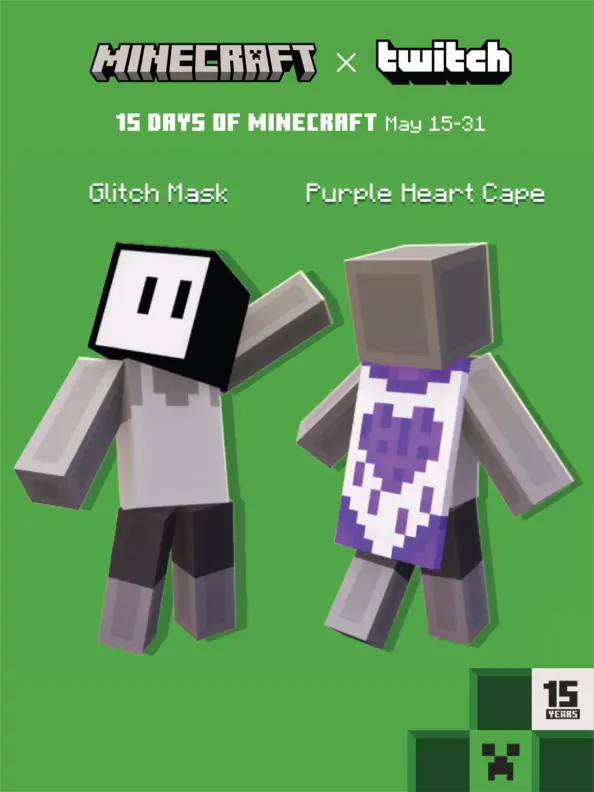
Twitch users will have a chance to earn two exclusive codes from May 15 to May 31. The Minecraft Twitch cape is confirmed to be rewarded from a watch quest, while the glitch mask is confirmed to be from a support a streamer event. Below, we have listed the exact requirements for both.
- Minecraft Twitch Cape: Watch 15 minutes of any participating Twitch Partner or Affiliate broadcasting in the Minecraft category.
- Glitch Mask: Visit any participating Twitch Partner or Affiliate broadcasting in the Minecraft category and purchase one subscription of any tier. Prime Subs will not grant the reward.
Once a code is obtained, redeeming the new cape or head cosmetic is as easy as going to the webpage
here, entering the code, and clicking submit. Just make sure you’re in the right section and logged in!
Java Edition Minecraft Twitch Cape Availability is Confirmed. Codes Expire June 30, 2024.
How to Change Capes: Java Edition
To check if you have any capes or to change the one you are wearing on Java Edition, simply open the
official Minecraft website and follow the steps below.
- Select “Account” in the top right corner and then “Login.”
- Click “My Games” on the left side of your Minecraft profile.
- Under “Minecraft: Java Edition,” select “Change Skin.”
- Scroll down to “Change Your Cape - PC/Mac.”
- Click your desired cape.
With that, your cape should update shortly!
How to Change Capes: Bedrock Edition
To check if you have any capes or to change the one you are wearing on
Bedrock Edition, simply open the Bedrock Edition client and follow the steps below.
- Login to the Minecraft Bedrock Edition client.
- Select “Dressing Room.”
- Click the red cape icon on the left side of the screen.
- Pick your desired cape and select “Equipped.”
Once done, the cape should appear on your avatar’s back right away.

 responseOkayLabel
 responsePerfectLabel
 responseLovedLabel