

Starting June 16, zombie apocalypse survivors can experience the 7 Days to Die 2.0: Storm’s Brewing Update, along with its new content, features, and improvements, by playing in the Experimental Branch. So, keep reading to learn how to access the Experimental Branch in 7 Days to Die, and enjoy Update 2.0 before everyone else!
 Note that the 7 Days to Die Experimental Branch is only available for PC players through Steam. The game’s console versions, particularly on PlayStation and Xbox, will generally receive the stable versions of each patch, including Update 2.0. Thankfully, the update's Stable version should be released on June 30, not too long after the Experimental Branch's version's launch date.
With that, here’s how to access the 7 Days to Die Experimental Branch and experience Update 2.0:
Note that the 7 Days to Die Experimental Branch is only available for PC players through Steam. The game’s console versions, particularly on PlayStation and Xbox, will generally receive the stable versions of each patch, including Update 2.0. Thankfully, the update's Stable version should be released on June 30, not too long after the Experimental Branch's version's launch date.
With that, here’s how to access the 7 Days to Die Experimental Branch and experience Update 2.0:
How to Play in the 7 Days to Die Experimental Branch
Note that the 7 Days to Die Experimental Branch is only available for PC players through Steam. The game’s console versions, particularly on PlayStation and Xbox, will generally receive the stable versions of each patch, including Update 2.0. Thankfully, the update's Stable version should be released on June 30, not too long after the Experimental Branch's version's launch date.
With that, here’s how to access the 7 Days to Die Experimental Branch and experience Update 2.0:
- 1. Log into your Steam account
- 2. Access your game Library and right-click on 7 Days to Die in the left sidebar
- 3. Select Properties in the context menu
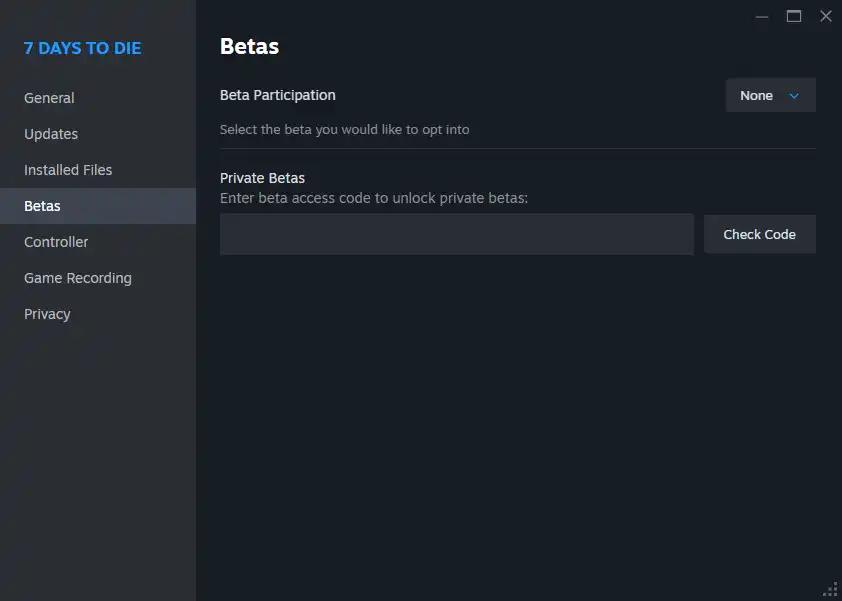
- 4. Select the Betas tab in the Properties window
- 5. Click the dropdown box next to Beta Participation, and choose the latest experimental version from the list
responseTitle
responseCount responseOkayLabel
 responsePerfectLabel
 responseLovedLabel